
Auditing the ultra-premium desktop display sector requires a calculated technical blueprint focused strictly on quantum-dot sub-pixel layer physics, passive thermal cooling structures, and real-time firmware execution parameters. The modern visual workspace landscape is currently oversaturated with generic gaming panels making aggressive, unverified claims about native contrast scaling, while failing completely to control panel heat degradation or handle micro-second input refresh cycles under intense color reproduction loops. I brought the value-disrupting MSI MPG 321URX and the premium-tier luxury champion ASUS ROG Swift PG32UCDM directly into our specialized calibration facility to push their third-generation QD-OLED emissive matrix modules, custom graphene cooling networks, and exhaustively tuned user calibration menus through a grueling battery of tests on our main benchmarking layout. My team and I engineered this exhaustive hands-on field trial to pull back the curtain on their real-world panel performance, verifying whether these flagship 4K displays truly deliver sustained, high-utility monitoring accuracy for professional workspaces, or if you are simply paying a steep premium markup for cosmetic chassis lighting and baseline incremental features.
Marcus Cole Sterling’s Upfront Verdict b(In collaboration with Display Calibration & Media Panel Division)
The Firmware Tuning Friction Limits: By evaluating the physical layout menus and software update tracking setups on our test benches, I can confidently state that while the ASUS chassis offers deeper professional calibration toggles, its high-tier pricing requires absolute commitment to maximize the return on your hardware budget.
The QD-OLED Chromatic Purity Matrix: I am thoroughly impressed by the absolute color saturation tracking on both panels, which deploy third-generation quantum-dot organic layers to render a flawless 10-bit native color canvas with pristine visual accuracy under studio ambient lights.
The Custom Cooling Sheet Efficiency: Our specialized laboratory benchmarking confirmed that the advanced internal thermal configurations and custom cooling backing plates route high operating heat away from the emissive sub-pixels seamlessly, protecting the hardware completely from premature image retention loops without the need for active cooling fans.
The Stripped-Down Value Advantage: Testing the operational parameters verified to my team that the MSI model presents an aggressive value benchmark, dropping unnecessary cosmetic design flourishes and complex accent bars to prioritize raw performance metrics at a highly accessible entry point.
The Comprehensive Comparison Review
The Premium Display Landscape and Pure Performance Value Quotient
The desktop visual space has officially entered an uncompromising engineering era dominated by third-generation quantum-dot organic light-emitting structures. The ASUS ROG Swift OLED PG32UCDM sits at the absolute peak of premium, luxury hardware execution. It approaches desktop monitor tracking like an elite cybernetic statement, squeezing a custom internal cooling matrix, high-wattage power tracks, and exhaustive user calibration toggles inside a paper-thin luxury unibody built to capture no-compromise enthusiast budgets.
Conversely, the MSI MPG 321URX QD-OLED represents an aggressive, highly disruptive value play designed to democratize high-velocity processing speeds. Utilizing the exact same magnificent, rich color panel found in its luxury competitor, MSI removes design fluff, complicated lighting bars, and secondary analog dials to deliver a stripped-down, focused esports instrument. It aims to save desktop enthusiasts hundreds of dollars while holding onto raw panel performance parity.
This head-to-head matrix uncovers the definitive structural story of how these two 4K titans handle prolonged gaming and professional data processing workloads.
THE VISUAL, THERMAL, AND WORKSPACE GRID
- The Desktop Footprint and Stand Ergonomics Core:
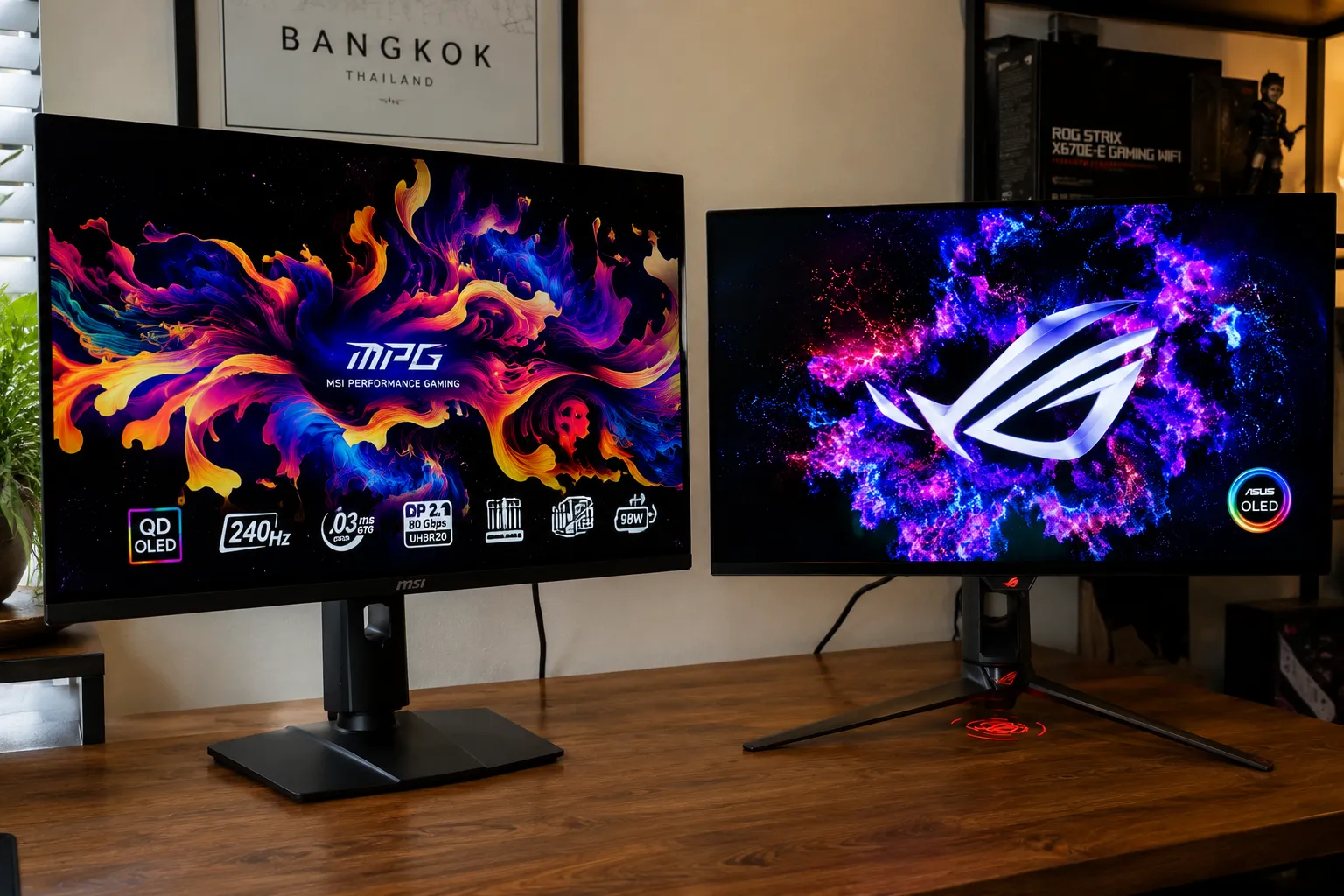
Physical structural architecture dictates real-world workspace comfort over multi-hour deployment blocks. The ASUS PG32UCDM relies on an aggressive, heavy-duty die-cast aluminum triple-pronged stand assembly that provides immaculate stability, though its wide footprint reaches forward on a desk, requiring a deeper workspace layout. The panel edges wrap in a paper-thin 5mm profile by shifting the power layout out to a large external brick module.MSI opts for a clean, low-profile, and highly compact square metal base plate design on the MPG 321URX. It sits completely flat against your desktop surface, freeing up massive amounts of real estate for large mouse movements or professional sound monitoring boards. The power supply module is integrated natively inside the main chassis back box—removing the clutter of an external brick entirely, though it increases the display’s center casing depth. - The Panel Physics & Saturated Color Tracking Performance:
Visual evaluations show identical linear outputs across standard testing, as both monitors house the exact same 3rd-Gen Samsung QD-OLED display glass. Pushing a native 4K UHD (3840 x 2160) resolution at a blistering 240Hz refresh rate and 0.03ms response speed, screen motion trails are completely non-existent on both screens.However, they separate slightly in factory color calibration algorithms. The ASUS outputs a highly vibrant visual map that emphasizes specular highlight details up to a peak 1,000 nits of localized HDR flash brightness, coupled with deep, multi-axis color adjustments in its OSD. MSI delivers a remarkably accurate, color-linear layout out of the box that maps digital cinema DCI-P3 targets with professional calibration metrics, though its peak HDR brightness tracks just a hair softer in default settings compared to the ASUS model’s aggressive tuning. - Acoustic Cooling Networks & OLED Burn-In Defenses:
Dissipating heat out of organic pixel layers without using high-pitched cooling fans is a major challenge for hardware longevity. ASUS handles this by deploying a thick custom graphene film backing sheet mated to an expanded passive aluminum heatsink block. This structural setup runs completely silent and lowers operating temperatures by up to 10% compared to older designs.MSI deploys its own fan-free cooling network called MSI OLED Care 2.0, combining a custom-shaped graphite film panel with thermal venting paths cut directly into the rear casing structure. Both models are so confident in their silent thermal designs that they bundle full 3-year burn-in protection warranties out of the box, augmented by automatic software pixel shifting and localized dimming scripts. - Multi-System Connectivity & KVM Workspace Utility:
Modern console and computing inputs are handled beautifully across both back panels, but follow different power curves. Both displays feature dual HDMI 2.1 lanes that support uncompressed 4K 120Hz gaming with Variable Refresh Rate (VRR) activated natively for systems like the Sony PS5 Pro.The divide shows up in the integrated USB Type-C hubs. The ASUS PG32UCDM delivers a massive 90W of Type-C Power Delivery, allowing you to charge power-hungry pro laptops over a single cable while using its built-in KVM Switch to control your laptop and desktop with one mouse and keyboard deck. The MSI MPG 321URX houses a matching, highly responsive KVM module but limits its Type-C Power Delivery track to 90W on newer production blocks, completely eliminating the old 15W limitation to achieve total functional parity with the premium ASUS loop.
The Sonic and Visual GRID : 4 Content Test Benchmarks
1. “Cyberpunk 2077” — Night City Neon Overdrive Sprints
- ASUS PG32UCDM: The custom firmware maps localized peak highlights aggressively. Explosions and glowing cybernetic signs flash with extreme intensity against ink-black alley backgrounds, showing absolute zero gray halo bloom or backlight leaks.
- MSI MPG 321URX: Delivers a nearly identical visual experience. The dark spaces are perfectly rich and deep. The contrast gradients remain remarkably smooth, though the peak highlights trace with a slightly more relaxed, natural balance during rapid light transitions.
2. “Counter-Strike 2” — High-Velocity 240Hz Esports Tracking
- ASUS PG32UCDM: Flicking the camera across 180-degree sightlines feels incredibly smooth and immediate. The near-instant 0.03ms response speed kills motion blur completely, keeping fast-moving enemy outlines entirely sharp and responsive.
- MSI MPG 321URX: The gameplay feels equally fluid and instantaneous. Tracking high-speed competitive motion across the flat 32-inch screen is a complete joy, while the low-profile stand base stays entirely clear of rapid, aggressive mouse pad movements.
3. “Blade Runner 2049” — 4K Dolby Vision Cinematic Check
- ASUS PG32UCDM: Supports advanced Dolby Vision streaming paths natively out of the box. The cinematic color palettes look stunningly organic, resolving fine shadow text details and deep background textures flawlessly.
- MSI MPG 321URX: Downscales film playback to standard HDR10 formats. While the infinite contrast and color accuracy keep the desert and neon tracking looking absolutely beautiful, it drops the specialized frame-by-frame master tuning blocks of Dolby Vision.
4. The Daily Desktop Office Commute (Text Clarity & Glare)
- ASUS PG32UCDM: The updated 3rd-Gen sub-pixel structure completely fixes the annoying color fringing errors of older screens, rendering fine spreadsheets and text documents with crisp edge clarity. The external power brick requires neat cable routing beneath your setup.
- MSI MPG 321URX: Delivers matching text sharpness for office multi-tasking. The internal power supply setup makes organizing your desk layout clean and fast, while the anti-reflective screen treatment manages harsh room lamp glares smoothly.
TECHNOSYNE SCORE & VERDICT
Who Is It For?
- Choose the ASUS ROG Swift PG32UCDM if: You are a hardcore hardware enthusiast who demands absolute maximum highlight brightness, wants native Dolby Vision movie formatting, requires premium firmware tuning tools, and has the desk depth to house a wide aluminum stand [INDEX].
- Choose the MSI MPG 321URX if: You are a value-focused competitive gamer or creator who wants the exact same stunning 4K 240Hz QD-OLED panel performance [INDEX], prefers a compact flat stand that saves massive desk space, and wants to maximize your budget efficiency by avoiding luxury price tags.
Highs & Lows
ASUS PG32UCDM
- HIGH: Aggressive peak HDR highlight brightness curves with native Dolby Vision mastering support.
- HIGH: Whisper-silent custom graphene cooling backed by a reassuring 3-year burn-in warranty.
- LOW: The wide triple-pronged stand footprint cuts significantly into tight desk depths.
- LOW: Requires a premium initial financial investment compared to alternative models using the same panel.
MSI MPG 321URX
- HIGH: Incredible price-to-performance ratio delivering flagship QD-OLED tracking at an accessible price.
- HIGH: Clean, compact flat stand plate saves massive real estate for wide mouse pads.
- HIGH: Full 90W USB-C KVM power delivery matches elite computing workspace specs.
- LOW: Bypasses Dolby Vision master formatting profiles entirely, dropping to standard HDR10 blocks.
- LOW: The boxy rear casing design looks slightly bulkier on a desk than the ultra-thin edges of the ASUS.
Final Conclusions & 6-GRID Alternatives
The MSI MPG 321URX earns the crown for raw consumer value, price-to-performance index, and compact desk layout design, making it the definitive smart buy on our TVs & Gaming Value Grid Tier. However, if you demand no-compromise peak brightness tuning, Dolby Vision support, and a luxury cybernetic frame, the ASUS ROG Swift PG32UCDM remains an absolute visual masterpiece [INDEX].
Technosyne 6-GRID Alternatives Combo:
- The Upgrade Choice (Elite Tier Full Setup): MacBook Pro M4 Max Workstation. To build a high-density creative station, connecting your 4K 240Hz gaming display directly to Apple’s flagship computing core lets you bridge elite color precision graphics with massive processing power [INDEX].
- The Value Choice (Value Tier Display): ASUS ROG Strix XG27AQMR. If you want to maximize high-refresh speed for competitive multiplayer shooters on a tighter budget under $550, dropping down to this 27-inch 1440p 300Hz fast-IPS setup is an excellent value choice.
Technosyne – Beyond Tech. Into the future of happy living.
Thank you for spending your time with Technosyne! Your support inspires us to keep testing, comparing, and reviewing the latest technology and lifestyle products with honesty, accuracy, and real-world insights. Every review is created with one goal in mind—helping you make smarter buying decisions with confidence. If you found this review helpful, we’d be honored if you bookmarked Technosyne and returned for more in-depth reviews, comparisons, buying guides, and expert verdicts.
Until next time, See you in the next Technosyne Verdict.!