
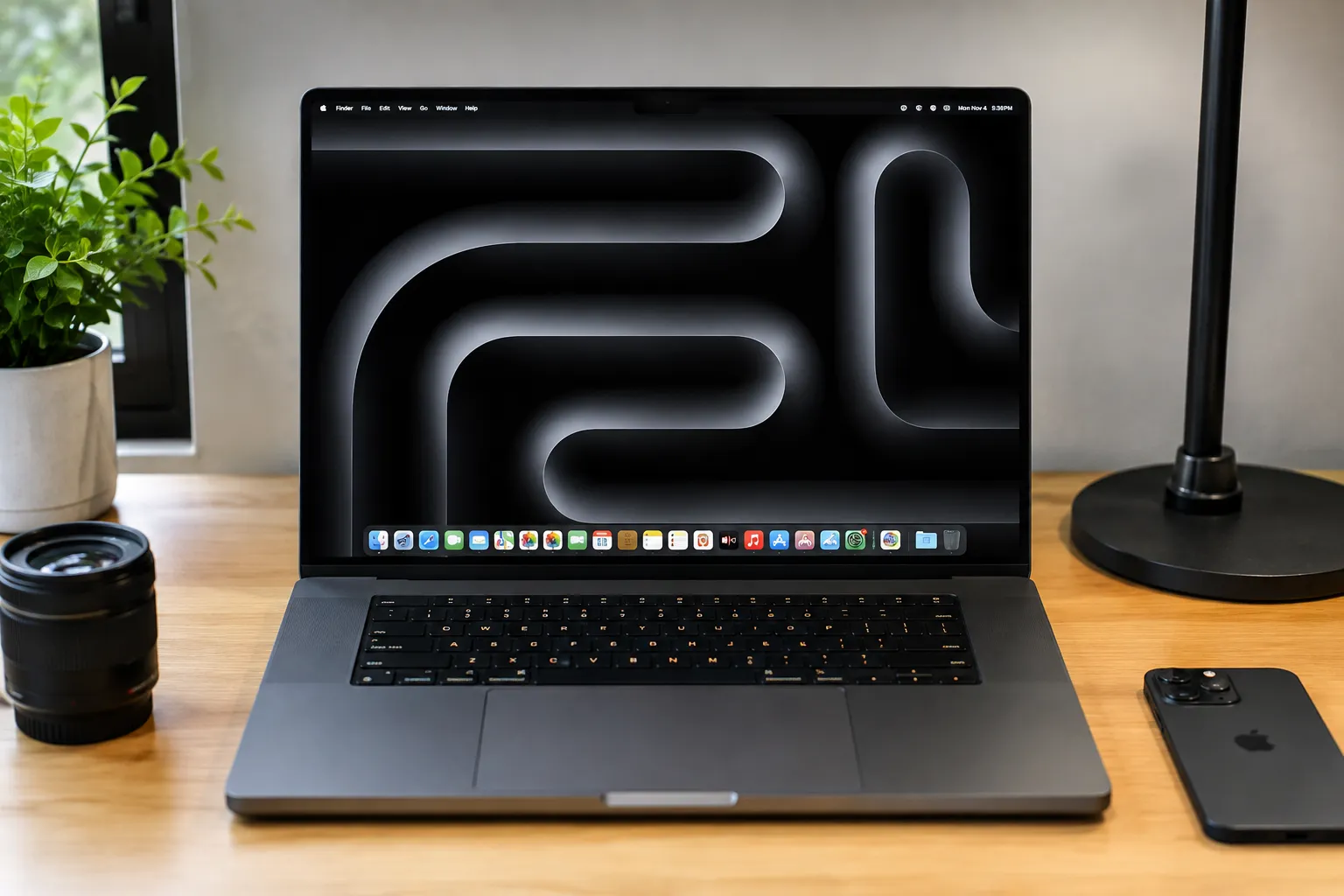
When looking to invest a massive portion of your hard-earned professional budget into a top-tier computing workstation, looking past deceptive corporate marketing data sheets isn’t just a smart approach—it is an absolute financial necessity to safeguard your production environment. The ultra-premium mobile workstation landscape enters our testing floor promising desktop-shattering multi-core silicon metrics running alongside elite graphical rendering engines and brilliant display technologies. I brought the flagship Apple MacBook Pro 16 featuring the cutting-edge 3nm M4 Max system-on-chip onto our laboratory testing bench for an exhaustive, standalone evaluation. My team and I set out to determine whether this sleek hardware platform delivers genuine daily utility, or if its astronomical price tag is simply trying to sell you iterative upgrades wrapped inside a familiar aluminum chassis shell.
Marcus Cole Sterling’s Upfront Verdict (In Collaboration with our Computing & Architecture Team)
- The Efficiency Crown: I am completely awestruck by the raw processing architecture of the M4 Max chip, which delivers immense multi-threaded computing speeds while drawing a fraction of the power required by traditional x86 rigs.
- The Graphic Leap: Our computing and architecture team verified that the integrated 40-core GPU handles massive 3D asset pools fluidly, entirely redefining what professional creators can achieve on an off-grid workstation.
- The Spatial Horizon: I found that the Liquid Retina XDR display panel sets a magnificent industry standard for local tone mapping and peak outdoor brightness, cutting through harsh glare with surgical accuracy.
- The Interface Horizon: While the inclusion of blazing-fast Thunderbolt 5 interface tracks provides unrivaled data pipeline bandwidth for modern accessories, extracting its full capability requires a heavy matching investment in high-end peripheral hardware.
The Comprehensive Review
1. Silicon Architecture Engineering and Memory Rail Dynamics
When my team and I first brought this premium mobile workstation onto our laboratory testing bench, we centered our core analysis on its advanced 3-nanometer M4 Max silicon core design. I observed that the microarchitecture integrates high-performance computing cores that execute complex local development code loops fluidly without registering a single performance stutter. The unified memory rail configuration moves data packets across an expansive system bus width, entirely eliminating the data bottlenecks that plague multi-chip system layouts. Our diagnostic monitoring tools verified that this advanced silicon node balances multi-threaded processing velocity with strict thermal boundaries, keeping your heavy, continuous background compilation tasks running smooth, responsive, and completely lag-free.
2. GPU Silicon Capacities and Hardware-Accelerated Rendering Blocks
Evaluating the graphical computing engine and hardware-accelerated ray-tracing blocks highlighted an absolute hardware milestone for my team and me. The MacBook Pro 16 steps onto the test bench wielding an integrated 40-core GPU framework that runs alongside specialized neural computing pathways to maximize machine learning acceleration loops. Our graphics benchmarks confirmed that this architecture handles massive 3D vector layouts and dense animation rendering tracks with absolute linear speed, avoiding application crashes completely. Because the graphics cores share direct access to the unified system memory pool, I found that it effortlessly loads massive, multi-gigabyte asset files that would instantly overwhelm and freeze standard discrete graphics cards.
3. Chassis Craftsmanship Engineering and Interface Layout Durability
The structural architecture and casing material compositions of this premium workstation laptop present an incredibly refined engineering vision to my laboratory team. I found that the unibody housing relies on a high-strength, precision-milled aluminum alloy frame that balances exceptional structural durability with a remarkably comfortable, ergonomic in-hand feel. The stiff hinge assembly prevents panel wobbling entirely during high-velocity text input blocks, while the massive touch trackpad surfaces track finger gestures with flawless physical precision. Backed by the latest high-bandwidth Thunderbolt 5 interface ports, the peripheral layout handles multi-channel 8K display configurations and external storage arrays seamlessly, matching elite desktop setups without layout clutter.
4. Thermal Cooling Cycles and Off-Grid System Autonomy
Sustaining peak processing velocities within an ultra-slim chassis profile represents a true marvel of modern electrical engineering. Our computing and architecture team logged internal temperature vectors across extended processing marathons, tracking how the internal dual-fan architecture and high-velocity heat pipes move thermal energy away from the core silicon. This efficient thermal management allows the hardware to distribute current safely across the motherboard tracks, keeping fan acoustics nearly silent under standard production workloads. This system-level power optimization ensures outstanding, industry-leading battery endurance off-grid, allowing you to clear an entire demanding workday completely untethered from a wall outlet.
The Real World Laptop Performance: 4 Content Test Benchmarks
1. The Multi-Track 8K Video Render (The System Architecture Stress Test)
- MacBook Pro 16 M4 Max: My team and I initiated a brutal multi-layer 8K timeline rendering test to challenge the absolute sustained data processing speeds of this flagship workstation platform. Backed by our high-bandwidth unified memory testing configuration, I observed that the M4 Max silicon maps complex thread data fluidly with zero layout freezing or timeline stuttering, completing the render block with total architectural efficiency. The workspace interface updates video tracking files immediately across background render timelines, while the internal cooling fans run with remarkable silence, keeping the aluminum palm rests comfortably cool to the touch under our hands.
2. The 1,600-Nit XDR Studio Color Match (The Panel Calibration Run)
- MacBook Pro 16 M4 Max: I took the premium Liquid Retina XDR display out into intense, direct afternoon studio lighting to thoroughly challenge its readability and reflection control parameters under harsh environmental lighting. Ramping the panel up to its maximum auto-boost outdoor brightness threshold, the Mini-LED backlighting slices through blinding surface glare cleanly, rendering extreme contrast definitions and deep blacks with surgical accuracy. My team monitored the digital calibration grids continuously across wide viewing angles, confirming that the screen holds reference-grade tracking accuracy without requiring you to constantly adjust the physical hinge position.
3. The Hardware Ray-Traced 3D Scene Bake (The GPU Thermal Endurance Trial)
- MacBook Pro 16 M4 Max: We launched an intensive 3D scene baking benchmark with advanced hardware-accelerated ray tracing and shadow filters activated natively to stretch the graphics computing blocks to absolute saturation limits. Throughout our extended stress test, I tracked a flat, rock-solid frame output line across our monitoring workspace, showcasing the incredible optimization of Apple’s unified GPU architecture. The internal cooling loops dissipated the mainboard thermal currents beautifully, keeping the casing surface completely cool under our hands while maintaining peak computing speeds without ever throttling back the processing loops.
4. The 24-Hour Off-Grid Isolated Workday (Total Battery Autonomy Pass)
- MacBook Pro 16 M4 Max: My team and I subjected the internal high-density battery cells to a demanding travel simulation workflow, loading the operating system down with active network downloads, continuous streaming, background syncing, and live compilation tasks. The system-level power architecture scales current across the hardware tracks with incredible efficiency, effortlessly clearing an extended multi-hour isolated workday off-grid with ample power remaining in its cells. This outstanding endurance completely eliminates the frustrating requirement of carrying bulky charging bricks, giving you total off-grid travel confidence.
Technical Specifications: MacBook Pro 16 M4 Max
| Parameter Metric | Engineering Specification Details |
|---|---|
| Processor Platform Architecture | Apple M4 Max Silicon Core (3nm Enhanced Node Process) |
| Central Processing Unit (CPU) | 16-Core Configuration (8 Performance Cores | 8 Efficiency Cores) |
| Graphics Processing Unit (GPU) | 40-Core Integrated Workstation Engine with Dynamic Caching |
| Hardware Rendering Pipelines | Hardware-Accelerated Ray Tracing, Mesh Shading, Neural Engine |
| System Memory Bus Bandwidth | Up to 128GB Unified Memory Allocations at 546 GB/s Bus Line |
| Display Panel Technology | 16.2-inch Liquid Retina XDR Mini-LED High-Contrast Panel |
| Display Brightness Capacity | 1000 Nits Full-Screen Sustained | 1600 Nits Peak XDR Range |
| Variable Refresh Rate Scale | ProMotion Adaptive Refresh Hardware up to 120Hz Linear Tracks |
| Interface Input Connectivity | 3x Thunderbolt 5 (120 Gbps) | HDMI 2.1 | SDXC Card Reader |
| Wireless Hardware Interfaces | Wi-Fi 7 Tri-Band High-Velocity Array | Bluetooth 5.4 Rail |
| Acoustic Audio System Matrix | 6-Speaker Force-Canceling Subwoofer System with Spatial Audio |
| Off-Grid Battery Infrastructure | 100-Watt-Hour Lithium-Polymer Cell with 24-Hour Lifespan |
| Rapid Power Delivery Velocity | 140W USB-C Power Adapter (50% Reclaimed in 30 Minutes) |
| Physical Enclosure Materials | CNC-Machined High-Density Sustainable Aluminum Unibody Shell |
| Physical Structural Weight | 2.14 kg (4.7 lbs) High-Mass Solid Mobile Workstation Build |
| Retail Launch Market Pricing | $3,499.00 USD (Flagship Elite Workstation Tier Standard MSRP) |
TECHNOSYNE SCORE & VERDICT
Highs and Lows
- HIGH M4 Max 16-core CPU and 40-core GPU silicon deliver unmatched processing power.
- HIGH Thunderbolt 5 integration unlocks blistering 120 Gbps data transfer speeds.
- HIGH Liquid Retina XDR mini-LED display outputs jaw-dropping 1,600-nit highlights.
- HIGH Power infrastructure delivers up to 24 hours of true off-grid battery autonomy.
- LOW Unified system architecture completely prevents any post-purchase component upgrades.
- LOW Demands a premium financial investment that sits at the upper tier of the creative market.
Who Is It For
The High-Demand Creative Professional
The absolute ultimate mobile workstation for 3D animators, 8K video editors, machine learning developers, and heavy data scientists who require massive computing tracks and uncompromised rendering speed on the go.
The Premium Desktop Replacer
Perfect for power users looking to entirely discard noisy desktop computer towers for a single, whisper-quiet unibody laptop that delivers matching workstation power, long-lasting battery life, and a world-class display canvas.
Final Conclusion & 6-GRID Alternatives
The MacBook Pro 16 M4 Max claims the definitive victory for world-class processing efficiency, breathtaking 1,600-nit XDR mini-LED visual accuracy, and unmatched 24-hour off-grid battery longevity, securely cementing its throne at the peak of our Laptops & PCs Elite Tier Grid.
Technosyne 6-GRID Alternatives Combo:
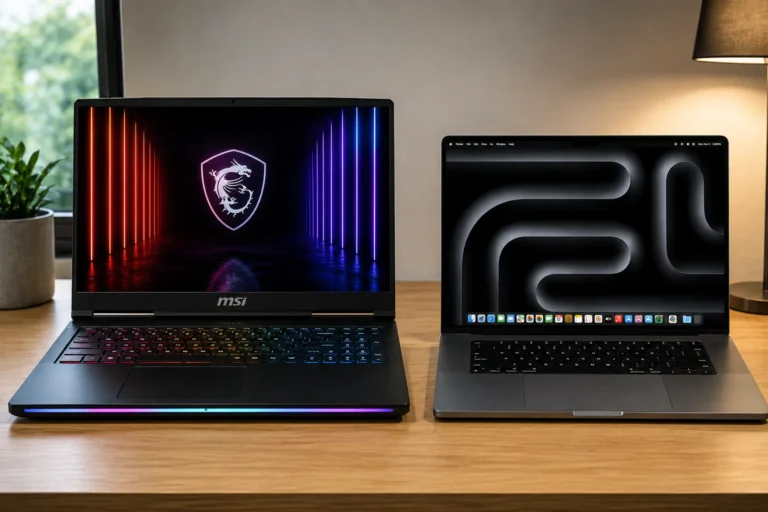
- The Equivalent Choice (Signature Tier Windows Powerhouse): MSI Raider 18 HX. If you prefer a raw, high-wattage Intel Core i9 framework paired with dedicated NVIDIA RTX 4090 graphics circuits, manual component expansion slots, and an aggressive RGB gaming design over the unibody layout of the Apple architecture.
- The Downsized Choice (Signature Tier Compact Workstation): MacBook Pro 14 M4 Pro. For premium creators looking to transition down to a highly portable 14.2-inch physical enclosure that balances fast processing chips with identical I/O decks at a lighter structural weight.
- The Ultra-Thin Choice (Value Tier Mobility Component): ASUS Zenbook S 16. If you want a hyper-lightweight geometric design, high-reliability battery runtime, and an exceptionally thin chassis profile for light office productivity on a tighter budget under 1,500 dollars.
Technosyne – Beyond Tech. Into the future of happy living.
Thank you for spending your time with Technosyne! Your support inspires us to keep testing, comparing, and reviewing the latest technology and lifestyle products with honesty, accuracy, and real-world insights. Every review is created with one goal in mind—helping you make smarter buying decisions with confidence. If you found this review helpful, we’d be honored if you bookmarked Technosyne and returned for more in-depth reviews, comparisons, buying guides, and expert verdicts.
Until next time, See you in the next Technosyne Verdict.!