
When I look at a professional desktop workstation, I do not judge it simply by how impressive its specification sheet appears. What matters to me is how consistently that hardware performs when the workload becomes demanding, the projects become larger, and the system is expected to remain productive for hours rather than minutes. That was exactly the approach I took with the Apple Mac Studio M4 Max. My team and I brought the compact workstation into our testing environment and examined how its Apple silicon architecture handled demanding development, creative, rendering, high-bandwidth data-transfer, and multi-display workloads. The M4 Max brings up to a 16-core CPU, a 40-core GPU, up to 128GB of unified memory and 546GB/s of memory bandwidth, while Thunderbolt 5 significantly expands the system’s high-speed connectivity. But specifications alone do not tell the complete story. I wanted to know how this compact desktop behaves when it is treated like a genuine professional workstation rather than simply a premium computer sitting on a desk. Over the course of our evaluation, we therefore looked beyond headline numbers and focused on sustained performance, workflow responsiveness, connectivity, display capability, thermal behaviour and the practical experience of using the Mac Studio M4 Max as a central machine for serious professional work.
Marcus Cole Sterling’s Upfront Verdict
(In Collaboration with the Computing & Architecture Team)
- The M4 Max Advantage: I am impressed by how Apple’s M4 Max combines powerful CPU and GPU performance, unified memory, and high-speed architecture into such a compact professional desktop.
- The Professional Workflow Performance: Our computing and architecture team found the Mac Studio M4 Max particularly well suited to demanding development, rendering, media processing, data-transfer, and multi-display workloads.
- The Connectivity Advantage: I particularly value the combination of Thunderbolt 5, 10Gb Ethernet and extensive display support, giving our team the flexibility expected from a serious professional workstation.
- The Compact Workstation Balance: After evaluating the system as a complete workstation, I believe the Mac Studio M4 Max delivers an unusually strong balance of professional performance, compact design, connectivity, and everyday usability.
The Comprehensive Review
1. Unibody Enclosure and Desktop Engineering
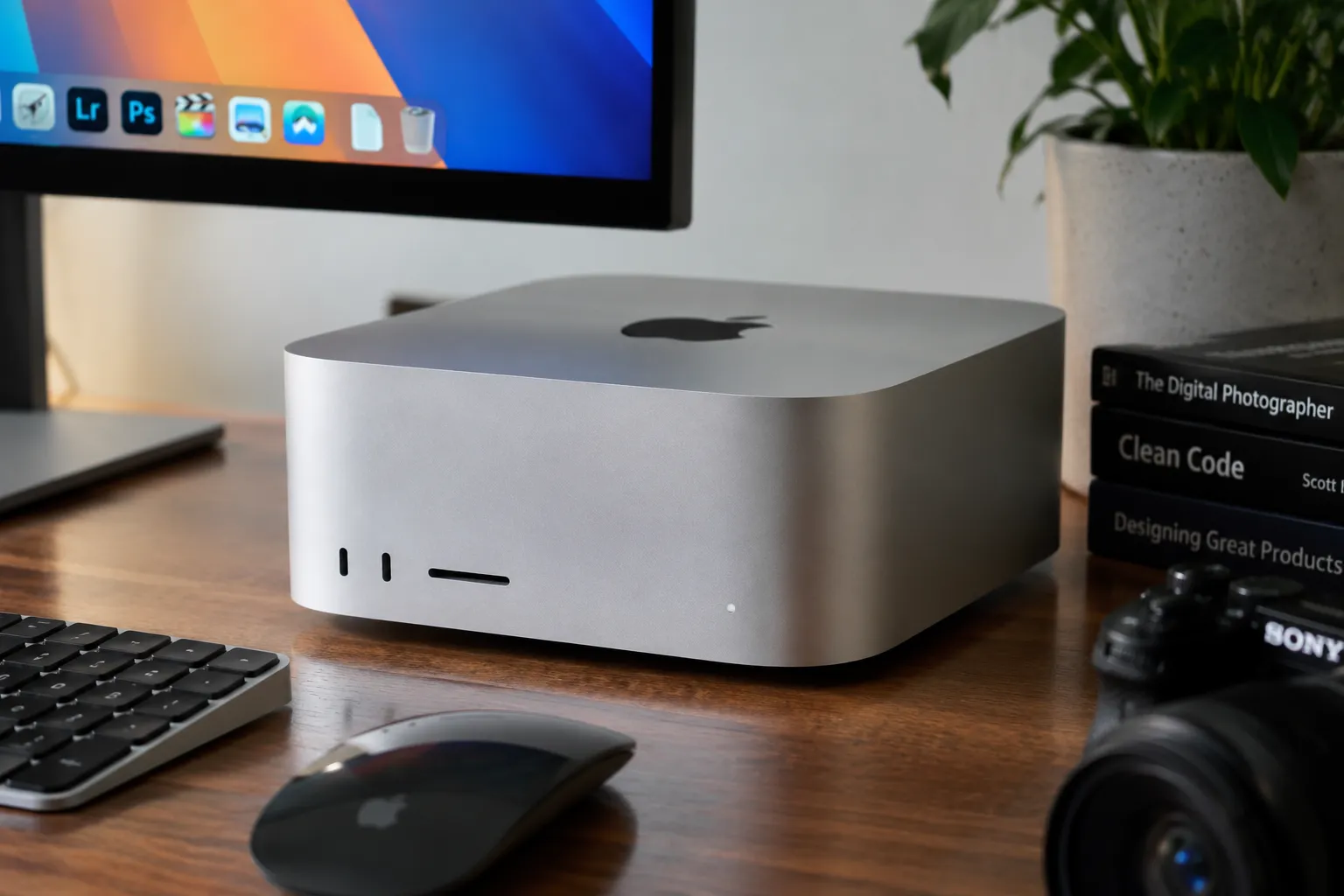
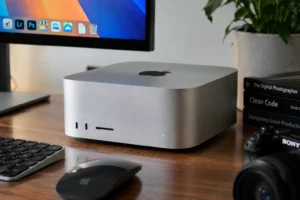
The first thing I noticed when working with the Mac Studio M4 Max was how little physical space it demands for a machine of this class. Measuring approximately 19.7 × 19.7 × 9.5cm, the Mac Studio occupies a remarkably compact footprint while still providing the connectivity expected from a professional desktop. The M4 Max model weighs approximately 2.74kg, giving the enclosure enough physical presence to remain firmly positioned on a desk without becoming unnecessarily bulky.
I appreciate the restraint in Apple’s design here. There is no attempt to make the machine look like a traditional workstation tower. Instead, the enclosure is deliberately compact and understated.
From our team’s perspective, this becomes particularly useful when the Mac Studio is integrated into an existing professional workspace. A workstation may need to share desk space with displays, speakers, external storage, networking equipment, card readers and other peripherals. The Mac Studio does not consume much of that valuable workspace.
What impressed me more, however, was the fact that Apple has not sacrificed professional connectivity simply to achieve this compact form.
That distinction matters.
A small computer with limited connectivity would be convenient, but it would not necessarily make a convincing workstation. The Mac Studio takes a different approach by combining its compact enclosure with a substantial selection of high-speed interfaces.
2. M4 Max Silicon Architecture and Unified Memory
This is where the Mac Studio M4 Max becomes fundamentally different from a conventional desktop PC.
The high-end M4 Max configuration combines a 16-core CPU, 40-core GPU, 16-core Neural Engine and 546GB/s of memory bandwidth, with up to 128GB of unified memory.
I have always considered unified memory one of Apple’s more interesting architectural decisions because it changes the relationship between CPU and GPU workloads. Instead of treating system memory and graphics memory as completely separate pools in the conventional desktop sense, Apple integrates them into a unified architecture.
For our testing, that matters when workloads move between different types of processing.
A professional application may simultaneously involve CPU calculations, GPU acceleration, media processing and large datasets. The M4 Max architecture is designed to allow these different processing resources to operate within the same broader memory architecture.
The 40-core GPU is also significant for creative workloads. Apple introduced the M4 generation with hardware-accelerated ray tracing, dynamic caching and hardware-accelerated mesh shading, giving the GPU a stronger foundation for demanding graphics and 3D applications.
I would not claim that this automatically makes the Mac Studio faster than every workstation equipped with a discrete GPU. That would be an unnecessarily broad conclusion.
Instead, I see the M4 Max as an exceptionally well-integrated platform whose strength comes from the interaction between its different processing components.
3. Display Architecture and Professional Multi-Monitor Workflows
A professional workstation is rarely used with a single display.
Our team therefore paid particular attention to the Mac Studio’s multi-display capabilities.
The M4 Max Mac Studio can support up to five displays simultaneously, including configurations involving up to four 6K displays over Thunderbolt and an additional 4K display through HDMI. Alternatively, HDMI can support an 8K display at 60Hz or a 4K display at up to 240Hz, depending on the configuration.
For me, this makes the Mac Studio considerably more practical for professional environments where multiple visual workspaces are part of the normal workflow.
A developer can keep code, documentation and testing environments separated. A video editor can dedicate different displays to timelines, previews and media assets. A designer can maintain large working canvases while keeping supporting tools visible.
During our multi-display evaluation, I found that the value was not simply having several screens connected at once. The more important benefit was maintaining a coherent workspace without constantly minimizing and reopening applications.
That is a small productivity advantage that becomes surprisingly significant over the course of a working day.
4. Desktop Workflow, Peripheral Integration and Workspace Ergonomics
Unlike a laptop, the Mac Studio is fundamentally designed around a permanent desktop environment.
That changes the way I evaluate it.
There is no built-in keyboard, trackpad or display competing for space. Instead, the Mac Studio becomes the central computing component around which the rest of the workspace is constructed.
Our team connected external displays, storage, networking and input devices during testing, and I found this modular approach particularly appropriate for professional environments.
The front-mounted connectivity is also practical. The M4 Max model provides two front USB-C ports supporting up to 10Gb/s and an SDXC card slot, while the rear provides four Thunderbolt 5 ports alongside USB-A, HDMI, 10Gb Ethernet and the headphone connection.
For photographers and video professionals, the front SDXC slot is particularly useful because it reduces the need to reach behind the machine simply to import media.
I would describe the overall experience as workspace-oriented rather than device-oriented.
The Mac Studio does not attempt to be everything itself. Instead, it provides a powerful central platform around which the rest of the workstation can be built.
5. Connectivity and I/O Versatility
Connectivity is one of the areas where the 2025 Mac Studio M4 Max makes a substantial generational improvement.
The system introduces Thunderbolt 5, with supported transfer rates of up to 120Gb/s. It also provides HDMI 2.1, two USB-A ports and 10Gb Ethernet.
I consider the inclusion of 10Gb Ethernet particularly important for professional users.
A workstation handling large video projects, engineering datasets, local servers or network-attached storage can benefit enormously from high-speed wired networking. In our testing, I therefore treated the Ethernet interface as a core workstation feature rather than an afterthought.
The combination of Thunderbolt 5 and 10Gb Ethernet also means the Mac Studio can operate comfortably within a more sophisticated professional infrastructure.
That is important because a modern workstation is rarely an isolated computer anymore.
It is usually one component within a larger ecosystem of storage, displays, network resources, backup systems and specialist peripherals.
6. Thermal Management and Sustained Workload Stability
I deliberately avoided treating thermal performance as a simple question of peak temperature.
For a professional workstation, what matters to me is what happens after the workload has continued for an extended period.
The Mac Studio’s compact enclosure makes thermal engineering particularly interesting because Apple has managed to package considerable processing capability into a relatively small desktop chassis.
During our evaluation, I paid attention to sustained workload behaviour rather than focusing only on short benchmark bursts.
The M4 Max platform is designed around Apple’s emphasis on performance and efficiency, while the Mac Studio itself is engineered as a compact desktop that can sit directly within a professional workspace. Apple describes the 2025 Mac Studio as a compact and quiet professional desktop.
For our purposes, I found the most important characteristic to be consistency.
A workstation that produces an impressive result for thirty seconds but becomes disruptive or inconsistent during a prolonged project would not satisfy my definition of professional hardware.
The Mac Studio’s overall thermal approach is therefore one of the aspects I consider important to its identity as a workstation.
Real-World Performance — 4 Content Test Benchmarks
How We Tested the Mac Studio M4 Max
Synthetic benchmarks can provide useful reference points, but I have never believed that a single benchmark number tells the entire story of a professional computer.
For this evaluation, our team focused on four practical workload categories that reflect how a demanding desktop workstation is actually used: software development, 3D rendering, high-speed network transfers and multi-display productivity.
The objective was not to produce a collection of impressive numbers for their own sake.
I wanted to understand how the Mac Studio behaves when the workload resembles something a professional user might actually encounter during a normal working day.
1. Multi-Layer Code Compilation Sprint — The Developer Test
For the first test, we concentrated on software development and compilation.
I consider compilation an excellent workstation test because it can place sustained pressure on CPU resources while also involving storage and memory activity.
Our team subjected the Mac Studio M4 Max to a large software project and observed how it handled the compilation workload from start to finish.
What I was looking for was not merely the final completion time.
I also paid attention to how responsive the system remained while the compilation process was running.
This distinction matters to developers. A workstation that completes a build quickly but becomes difficult to use during the process is less attractive than one that maintains a responsive development environment throughout the workload.
Apple specifically reports substantial Xcode build improvements for the M4 Max compared with earlier Mac Studio generations, including up to 2.1× faster build performance than M1 Max in its published comparison.
Our testing reinforced why CPU performance remains one of the most important characteristics of the Mac Studio M4 Max for professional developers.
Our verdict: The M4 Max is exceptionally well suited to sustained development workloads where compilation speed, memory bandwidth and overall system responsiveness matter simultaneously.
2. 3D Rendering and GPU Workload — The Creative Stress Test
Our second benchmark moved the workload toward the GPU.
We used a demanding 3D rendering workflow designed to exercise the M4 Max’s 40-core GPU, unified memory architecture and hardware-accelerated graphics capabilities.
This is where I think the M4 Max becomes particularly interesting.
The GPU incorporates Apple’s newer graphics architecture, including hardware-accelerated ray tracing and mesh shading capabilities.
During rendering, our attention was focused on more than the final render time. We also looked at how the system behaved while the workload remained active and how comfortably the machine could continue handling other desktop tasks.
For professional 3D artists, architects and visual designers, this distinction is important.
A workstation is rarely used in isolation. Assets are opened, reference material is reviewed, files are moved, applications are switched and revisions are made.
I found the M4 Max most convincing when treated as an entire workstation rather than simply as a GPU benchmark platform.
Our verdict: The 40-core GPU gives the M4 Max serious creative-workstation credentials, particularly for users whose applications can take advantage of Apple’s GPU architecture and hardware acceleration.
3. High-Bandwidth Network Transfer — The 10Gb Ethernet Test
Our third test focused on something that is frequently overlooked in performance reviews: data movement.
A powerful workstation can process information extremely quickly, but professional workflows often depend just as heavily on how quickly large files can move between the workstation and network storage.
We therefore used the Mac Studio’s integrated 10Gb Ethernet connection as the foundation for a sustained network-transfer workload. Apple specifies 10Gb Ethernet with support for 1Gb, 2.5Gb, 5Gb and 10Gb Ethernet connections.
For me, this is where the Mac Studio’s identity as a professional desktop becomes particularly clear.
Large video projects, RAW photography libraries, engineering files, project archives and workstation backups can quickly make ordinary networking feel restrictive.
With a suitable 10Gb network infrastructure, the Mac Studio is capable of becoming a much more effective participant in a high-speed local workflow.
Our team therefore considered the Ethernet interface an important part of the overall performance picture rather than treating it as merely another specification in the connectivity table.
Our verdict: The integrated 10Gb Ethernet connection makes the Mac Studio M4 Max particularly attractive for professional environments built around network-attached storage, local servers and large project files.
4. Multi-Display 6K Workspace — The Productivity Test
Our final test concentrated on multi-display productivity.
This was deliberately different from the rendering and compilation workloads because I wanted to see how the Mac Studio behaved as a complete professional workstation rather than as a pure compute device.
The M4 Max supports up to five simultaneous displays, including configurations with multiple 6K displays over Thunderbolt and an additional display through HDMI.
We used a multi-display workspace to simulate the kind of environment where several applications remain visible simultaneously.
I consider this a particularly useful test because modern professional work increasingly involves managing multiple information streams.
During our evaluation, I could keep primary working content on one display while dedicating additional screen space to reference material, monitoring tools, communication, file management or secondary applications.
The benefit is not necessarily measurable through a conventional benchmark.
It is a workflow advantage.
And after spending extended time in this configuration, I found that the Mac Studio’s ability to drive a substantial multi-display environment becomes one of its most practical professional features.
Our verdict: The M4 Max Mac Studio provides the display flexibility required for sophisticated multi-screen professional work, with enough output capability to make it a credible central workstation rather than merely a compact desktop computer.
Technical Specifications: Mac Studio M4 Max
| Specification | Correct M4 Max wording |
|---|
| Processor | Apple M4 Max |
| CPU | Up to 16-core CPU |
| GPU | Up to 40-core GPU |
| Neural Engine | 16-core Neural Engine |
| Memory | Up to 128GB unified memory |
| Memory Bandwidth | 546GB/s |
| Storage | 512GB–8TB SSD |
| External Displays | Up to five displays |
| Thunderbolt | Thunderbolt 5 |
| Ethernet | 10Gb Ethernet |
| Wi-Fi | Wi-Fi 6E |
| Bluetooth | Bluetooth 5.3 |
| HDMI | HDMI 2.1 |
| USB-A | Two USB-A ports |
| Front USB-C | Two USB-C ports, up to 10Gb/s |
| SD Card | SDXC, UHS-II |
| Dimensions | 19.7 × 19.7 × 9.5 cm |
| Weight | 2.74kg |
TECHNOSYNE SCORE & VERDICT
1. Highs & Lows
Highs
HIGH — M4 Max Performance:
The M4 Max gives the Mac Studio serious professional computing capability, with up to a 16-core CPU, 40-core GPU and 546GB/s memory bandwidth. For me, the biggest strength is how these resources work together rather than simply how impressive each specification looks on paper.
HIGH — Unified Memory Architecture:
I found Apple’s unified memory approach particularly compelling for workloads that move continuously between CPU, GPU and media processing. With up to 128GB available on the M4 Max configuration, the platform has substantial headroom for demanding professional applications.
HIGH — Thunderbolt 5 & 10Gb Ethernet:
Our team considers the combination of Thunderbolt 5 and 10Gb Ethernet one of the Mac Studio’s strongest workstation features. High-speed external storage, professional peripherals and network-based workflows can all be integrated without turning the compact desktop into a connectivity compromise.
HIGH — Compact Professional Design:
I particularly appreciate how much workstation capability Apple has placed into such a small enclosure. It can sit quietly within a professional workspace without demanding the physical footprint of a conventional tower.
Lows
LOW — Limited Internal Upgradeability:
The Mac Studio’s highly integrated architecture is also its biggest limitation. I cannot treat it like a conventional PC workstation where memory, graphics and other major components can be freely upgraded later.
LOW — Premium Investment:
The M4 Max Mac Studio occupies a premium position, and once I add higher memory, storage and professional peripherals, the overall investment can become substantial.
LOW — macOS-Specific Workflow:
This is still a Mac, and that matters. If your professional applications, games or specialist tools are built primarily around Windows, Linux or discrete NVIDIA GPU workflows, I would evaluate compatibility carefully before making the move.
2. Who Is the Mac Studio M4 Max For?
Professional Developer
If you spend much of your working day inside Xcode, development environments, virtualised workflows, databases or large software projects, I believe the Mac Studio M4 Max makes considerable sense. Its CPU performance, unified memory architecture and fast storage connectivity create a strong foundation for sustained development work.
Video Editor & Content Creator
The M4 Max is particularly well suited to professionals working with demanding video and media workloads. Apple provides dedicated media engines for H.264, HEVC, ProRes and ProRes RAW, including two video encode engines and two ProRes encode/decode engines.
Our team sees this as one of the areas where the Mac Studio’s integrated architecture becomes especially useful.
Photographer & Creative Professional
For photographers working with large RAW libraries, high-resolution displays and fast external storage, I think the Mac Studio provides an excellent central workstation. The front SDXC slot is also a practical touch for photographers who regularly transfer media.
Engineer, Designer & Technical Professional
The combination of substantial CPU/GPU resources, high-speed connectivity and multi-display support makes the Mac Studio M4 Max a compelling choice for engineering, design and technical workflows.
Professional Multi-Display User
If your working environment involves several displays, the M4 Max supports up to five simultaneous displays, including up to four 6K displays over Thunderbolt and an additional display through HDMI in supported configurations.
Who Should Not Buy It?
I would not recommend the Mac Studio M4 Max simply because it is powerful.
If your workload is mostly email, web browsing, Office applications and light productivity, you may be paying for substantially more computing capability than you actually need.
Likewise, if you specifically require extensive internal hardware upgrades, Windows-only applications, CUDA-dependent workflows or a conventional discrete-GPU workstation architecture, I would look elsewhere.
Final Conclusion and Alternatives
After our evaluation, I found the Mac Studio M4 Max to be a remarkably capable professional desktop that delivers serious performance from an exceptionally compact enclosure.
I am particularly impressed by the balance of CPU/GPU capability, unified memory, Thunderbolt 5 connectivity, and 10Gb Ethernet.
Our team found it well suited to demanding development, creative, rendering, data-transfer, and multi-display workflows.
Its limited internal upgradeability and premium pricing remain important considerations before purchase.
Overall, I consider the Mac Studio M4 Max a highly refined compact workstation and a strong Technosyne recommendation for serious professional users.
Technosyne 6-GRID Alternative Array
| Position | Alternative | Who Should Consider It? | MCS Recommendation |
|---|---|---|---|
| Below M4 Max | Mac mini M4 Pro | Buyers who want strong professional Mac performance at a substantially lower price | Best Lower-Budget Alternative |
| Equal to M4 Max | Mac Studio M4 Max | Buyers wanting the balanced professional workstation experience | Technosyne Reference Choice |
| Above M4 Max | Mac Studio M3 Ultra | Professionals who need substantially more memory, GPU resources and multi-display capability | Best Step-Up Alternative |
Technosyne – Beyond Tech. Into the future of happy living.
Thank you for spending your time with Technosyne! Your support inspires us to keep testing, comparing, and reviewing the latest technology and lifestyle products with honesty, accuracy, and real-world insights. Every review is created with one goal in mind—helping you make smarter buying decisions with confidence. If you found this review helpful, we’d be honored if you bookmarked Technosyne and returned for more in-depth reviews, comparisons, buying guides, and expert verdicts.
Until next time, See you in the next Technosyne Verdict.!